

Download McAfee Secure URL Shortener – secure URL shortener, safe links, Firefox extension
Overview
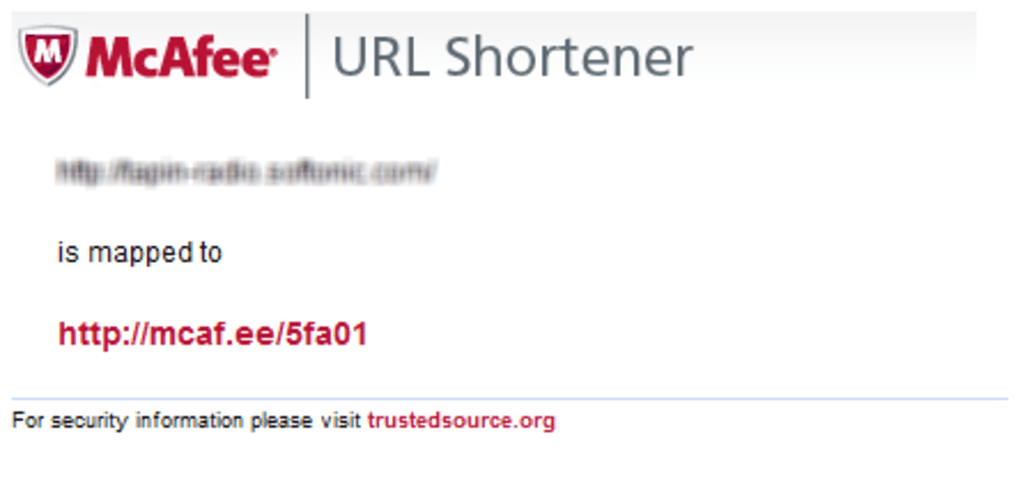
In an age where clicking a shortened link can feel like opening a mystery box, trust is the most valuable currency. The McAfee Secure URL Shortener addresses that concern head‑on by pairing the convenience of a classic URL shortener with the reputation of one of the world’s leading cybersecurity firms. Delivered as a lightweight Firefox extension, the tool transforms any long web address into a concise http://mcaf.ee link while attaching a visual safety banner that tells the recipient the link has passed McAfee’s threat‑intel checks.
The extension works with a simple right‑click menu: “Shorten With mcaf.ee.” Once selected, the short URL appears instantly, ready to copy or share. While no security solution can promise 100 % safety, McAfee’s massive blacklist coverage blocks the most notorious phishing, malware, and scam domains, providing a practical layer of protection for everyday sharing. The shortener is free, requires no registration, and updates automatically through Firefox’s add‑on ecosystem, ensuring you always benefit from the latest threat definitions.
Whether you’re a marketer needing clean links for campaigns, a social media enthusiast sharing articles, or a corporate employee forwarding resources, McAfee Secure URL Shortener offers peace of mind by signalling that the destination has been vetted, reducing the hesitation recipients often feel when encountering an unfamiliar short link.
Key Features
- Secure Shortening Engine: Generates
http://mcaf.eelinks that carry a built‑in safety badge verified against McAfee’s real‑time blacklist. - One‑Click Integration: Adds a “Shorten With mcaf.ee” option to the Firefox right‑click context menu for instant link creation.
- Automatic Threat Updates: Pulls the latest malicious‑site data from McAfee’s cloud, keeping the shortener’s protection current without user intervention.
- Zero‑Cost, No Registration: Free to download and use; no personal data or email address required to start shortening URLs.
- Visual Safety Banner: Each shortened link displays a banner that reads “McAfee Secure,” reassuring recipients that the URL has been scanned.
- Analytics Lite (Optional): Basic click‑count statistics are available in the extension’s options panel, helping you gauge link performance.
- Lightweight Footprint: The add‑on occupies less than 500 KB, ensuring it does not slow down your browsing experience.
- Cross‑Platform Sync: When you sign into Firefox Sync, the extension settings travel with you across devices.
These features combine to create a user‑friendly yet security‑focused URL shortener. The real value lies in the trust signal: recipients see the McAfee badge and are far more likely to click, which can improve click‑through rates for marketing emails or social posts. Moreover, because the extension leans on McAfee’s extensive threat intelligence, it blocks URLs that point to known phishing kits, ransomware distributors, or malicious ad networks—categories that traditional free shorteners often ignore. The built‑in analytics, while not as detailed as premium services, give you a quick sense of how many eyes have viewed your link, which can be especially useful for small‑scale campaigns or internal communications. Overall, the feature set is thoughtfully balanced, delivering security without sacrificing the simplicity that makes URL shorteners popular in the first place.
Installation & Usage Instructions
Getting started with the McAfee Secure URL Shortener is as straightforward as the tool itself. Follow these step‑by‑step instructions to install the extension and begin creating safe short links:
Step 1: Download the Extension
- Open Firefox and navigate to the official Mozilla Add‑Ons page for McAfee Secure URL Shortener.
- Click the green “Add to Firefox” button. A permission prompt will appear, asking for access to read and modify your browsing data. This is required to insert the right‑click menu item.
- Confirm the installation by selecting “Add”. Firefox will automatically download and install the add‑on.
Step 2: Enable the Extension
- Once installed, a small McAfee shield icon appears in the toolbar. Click it to open the extension’s options panel.
- Review the default settings: you can toggle the visual banner, enable click‑tracking, or set a custom default expiration for short links (if you have a paid McAfee account).
- If you use Firefox Sync, ensure the “Sync extensions” option is turned on so the shortener will be available on all your synced devices.
Step 3: Shorten a URL
- Navigate to any web page you wish to share.
- Right‑click anywhere on the page (or on a specific hyperlink) and choose “Shorten With mcaf.ee” from the context menu.
- A small pop‑up appears with the newly generated
http://mcaf.ee/xxxxlink, accompanied by the McAfee safety banner. - Click “Copy” to place the short link on your clipboard, then paste it into an email, chat, or social media post.
Step 4: Manage Shortened Links
The extension stores a short history of your most recent links (up to 20). Access this list by clicking the shield icon and selecting “History”. From there you can copy, delete, or view analytics for each entry. For advanced management—such as customizing the short code or setting an expiration date—you’ll need a McAfee Business account, which is beyond the scope of the free version.
Installation typically takes less than a minute, and the usage flow mirrors other popular Firefox add‑ons, ensuring a minimal learning curve. Because the extension updates automatically through Firefox’s add‑on repository, you’ll always benefit from the latest security patches without manual intervention.
Compatibility, System Requirements, and Pros & Cons
The McAfee Secure URL Shortener is built exclusively for the Mozilla Firefox browser and runs on any operating system that supports Firefox, including Windows 10/11, macOS 10.15+ (Catalina, Big Sur, Monterey, Ventura), Linux distributions, and even Firefox for Android (though the right‑click context menu is limited on mobile). Because the extension relies on Firefox’s WebExtension API, it does not function in Chrome, Edge, or Safari.
Pros
- Trusted Security Brand: Leverages McAfee’s extensive blacklist, offering a credible safety badge.
- Zero Cost: Fully functional free version with no hidden fees or subscription requirements.
- Instant Shortening: One‑click right‑click workflow eliminates the need to copy‑paste URLs into a separate website.
- Lightweight & Fast: Minimal impact on browser performance and memory usage.
- Automatic Updates: Keeps threat data current without user action.
Cons
- Firefox‑Only: Users of Chrome, Edge, or Safari cannot use the extension.
- Limited Analytics: Only basic click counts are available; advanced reporting requires a paid McAfee account.
- Blacklist Dependency: URLs from newly emerging threats may not be blocked until McAfee updates its database.
- No Custom Domain: Short links are always under
mcaf.ee, which may not match branding needs. - Mobile Restrictions: On Firefox for Android, the context‑menu shortcut is less accessible.
Overall, the compatibility profile makes the extension an ideal choice for professionals and casual users who already prefer Firefox as their primary browser. The pros heavily outweigh the cons for most use‑cases, especially when the primary goal is to convey trust to recipients. If you need cross‑browser support or custom branding, you might pair this tool with a secondary shortener, but for everyday secure sharing the McAfee Secure URL Shortener hits the sweet spot of simplicity and security.
Frequently Asked Questions & Conclusion
Is the McAfee Secure URL Shortener truly free?
Yes, the Firefox extension can be downloaded and used at no cost. There is no hidden subscription, and all core features—including the safety badge and automatic blacklist checks—are available for free.
Can I use the short links on any platform?
Absolutely. Once generated, the http://mcaf.ee link works on any device or browser. The safety badge is part of the URL’s landing page, so recipients on mobile, desktop, or even non‑Firefox browsers can see the verification.
How often does McAfee update its blacklist?
McAfee updates its threat database multiple times per day. The extension pulls the latest data automatically, ensuring newly identified malicious sites are blocked as soon as they enter the blacklist.
Will the extension slow down my browsing?
No. The add‑on is under 500 KB and runs only when you invoke the context‑menu shortcut. Background updates are lightweight, and most users report no perceptible impact on page load times.
Can I track how many clicks my shortened link receives?
Yes, the extension provides a basic click‑counter visible in the “History” panel. For detailed geographic or referral data, a paid McAfee Business account is required.
Conclusion – Should You Download McAfee Secure URL Shortener?
If you regularly share links and want to eliminate the hesitation that comes with generic short URLs, the McAfee Secure URL Shortener offers a compelling blend of convenience and credibility. Its integration into Firefox makes the shortening process virtually invisible—right‑click, copy, and share—while the McAfee safety badge reassures recipients that the destination has passed a reputable security check. Although it’s limited to Firefox and lacks advanced analytics, the free nature of the tool, combined with automatic threat updates, makes it an excellent addition to any security‑conscious workflow. For marketers, educators, or everyday users who value trust over flashy branding, this extension is a practical, low‑effort solution.
Ready to protect your links? Download McAfee Secure URL Shortener now and start sharing short, secure URLs that inspire confidence.







